Overview
TealFiler is a desktop file manager for Linux, which works like Windows Explorer on Windows or Filer on a Mac (Figure 1). While there are other file managers available for Linux, TealFiler is designed with minimal dependencies in mind. It is also written in Python, making it easy to adapt and modify. TealFiler was originally written by Prof. Bill Griffin-Dubson as part of his master's degree.
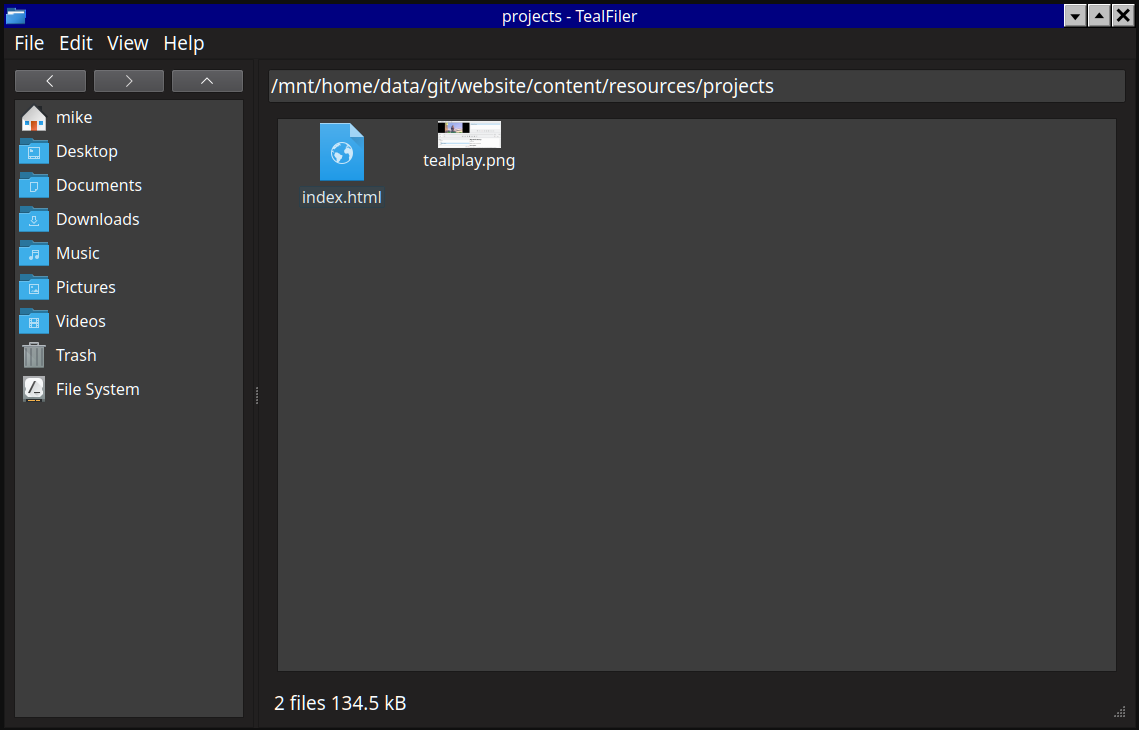
As it is currently implemented, TealFiler is already a capable local file manager for Linux. However, there are a number of features that still need to be implemented:
- A "Delete" context menu action would allow bypassing the trash when removing a file. This capability is especially helpful for large downloads (like Linux ISO files) that are unlikely to be restored later.
- A settings dialog to configure the mimeapps.list file would make it easier to set default programs for file types.
- Many users expect to have a search feature, although file search introduces privacy and forensics concerns whenever an index of file contents is created and stored on the system. A private file search that uses standard tools (such as find and grep) to search on demand without creating a search index would enable file search, albeit with some performance limitations compared to maintaining an index.
- A comprehensive bulk file renaming feature would be extremely nice to have, since it could automate file name adjustments using numbering, regular expressions, etc.
- Removable mass storage device support is currently unimplemented. One possibly straightforward way to implement this functionality would be to use udisks2 for mounting and fusermount for unmounting. The cleanest approach may involve using Qt D-Bus to talk to the udisks daemon.
- Browsing network shares as a regular user would be helpful on networks where such shares exist. Implementation will require selecting and integrating a library like smbprotocol or pysmb for Python-native connections.
- Android/MTP device support would make transferring files to and from a mobile phone easier. At present, the cleanest solution appears to be using the CLI version of Android File Transfer for Linux with the subprocess module. Development of this feature would require both a Linux host and an Android phone.
- File transfer over Bluetooth via the OBEX protocol would be another way to transfer data to and from devices. This functionality will require using Qt D-Bus to communicate with BlueZ's OBEX API.
- SFTP support would allow TealSite to upload files to servers and manage remote files graphically. The Python Paramiko library could be used to implement this support. Alternatively, sshfs can be used to mount a remote SFTP share.
Note that the approach to be taken in TealFiler differs from the main file managers in use on other Linux desktops (Dolphin, Thunar, PCManFM-qt, Nautilus, etc.). The competing file managers tend to rely on an abstraction layer such as GVFS or KIO to support different underlying file systems and remote protocols. Both GVFS and KIO introduce a considerable number of hard dependencies, and any reduction in these dependencies must be done at compile time for the corresponding library. By using external programs and Python libraries directly, we can make all dependencies in TealFiler optional. This way, the file manager stays relatively small on systems that have no need for the extra functionality.